Mission control for digital operations

See clearly. Stay in control.

NxtGen Shield brings WordPress security posture, live firewall controls, threat events, traffic activity, and response actions into one operational command center.

Live values come from the connected site and Shield’s tenant-scoped event records—never fabricated counters.

Shield Mission Control Shield command center
Operational view
Current state Protected view ready

Connection health, firewall state, scan findings, and events remain visible in one workspace.

Signal review Live workflow
Posture findingImpact and correction ready for review
Review
Firewall updateSigned synchronization confirmed
Clear
Mission path Shield flow
  1. 1
    ConnectLink the signed WordPress agent
  2. 2
    ReviewInspect posture and security events
  3. 3
    RespondApply a verified control or correction
Trust starts with accuracy. Shield distinguishes recorded events, live connection state, and verified scan results from assumptions.

Read the security approach

From noise to command

Clarity is the first layer of control.

Shield turns connected WordPress security and traffic signals into an ordered view with direct operational actions.

01

Reduce the noise

Review agent health, firewall state, scan findings, traffic, and recent events from one dashboard.

02

Make priority visible

Separate critical, high, medium, and low events while surfacing open posture findings.

03

Close the loop

Block an IP, update firewall rules, run a new scan, or open the relevant WordPress correction path.

Product command center

One command center for site protection.

The live product combines security posture, firewall enforcement, threat response, WordPress controls, traffic context, and workspace settings.

01

Security overview

See signed-agent health, firewall runtime, posture score, traffic activity, findings, and recent events.

02

Live firewall

Manage protection rules and blocked IP addresses synchronized to the connected WordPress runtime.

03

Threat and posture review

Inspect recorded security events and scan WordPress configuration, HTTPS, headers, endpoints, plugins, and core signals.

04

Authenticated response controls

Run signed WordPress operations and controlled defensive probes from the tenant-bound workspace.

Command center preview
Operational
AgentConnectedSigned channel
FirewallActiveRuntime state
PostureReviewLatest scan
Recorded activityDashboard preview
Review itemState
Posture findingReview
Firewall synchronizationClear
View
Operational state

A simplified preview of Shield’s live operational surfaces; account data appears only after authentication.

How the experience works

From connection to clear action.

Shield supports standalone authentication and NxtGen Space access, then connects each tenant to its registered WordPress site.

  1. 01

    Create or enter your workspace

    Sign in directly with email or Google, or open Shield through the authenticated NxtGen Space workspace.

  2. 02

    Connect WordPress

    Use the tenant-bound signed agent to report connection health, security events, traffic activity, and configuration state.

  3. 03

    Review and respond

    Run posture scans, manage firewall protection, investigate events, and apply authenticated WordPress controls.

When Shield matters

Built for moments that demand visibility.

Built for operators who need a clear view of a connected WordPress site’s security posture and live operating state.

Fragmented visibility

When the full picture is spread across too many places.

Bring connection health, firewall enforcement, threat events, scan results, traffic, and recommended actions into one workspace.

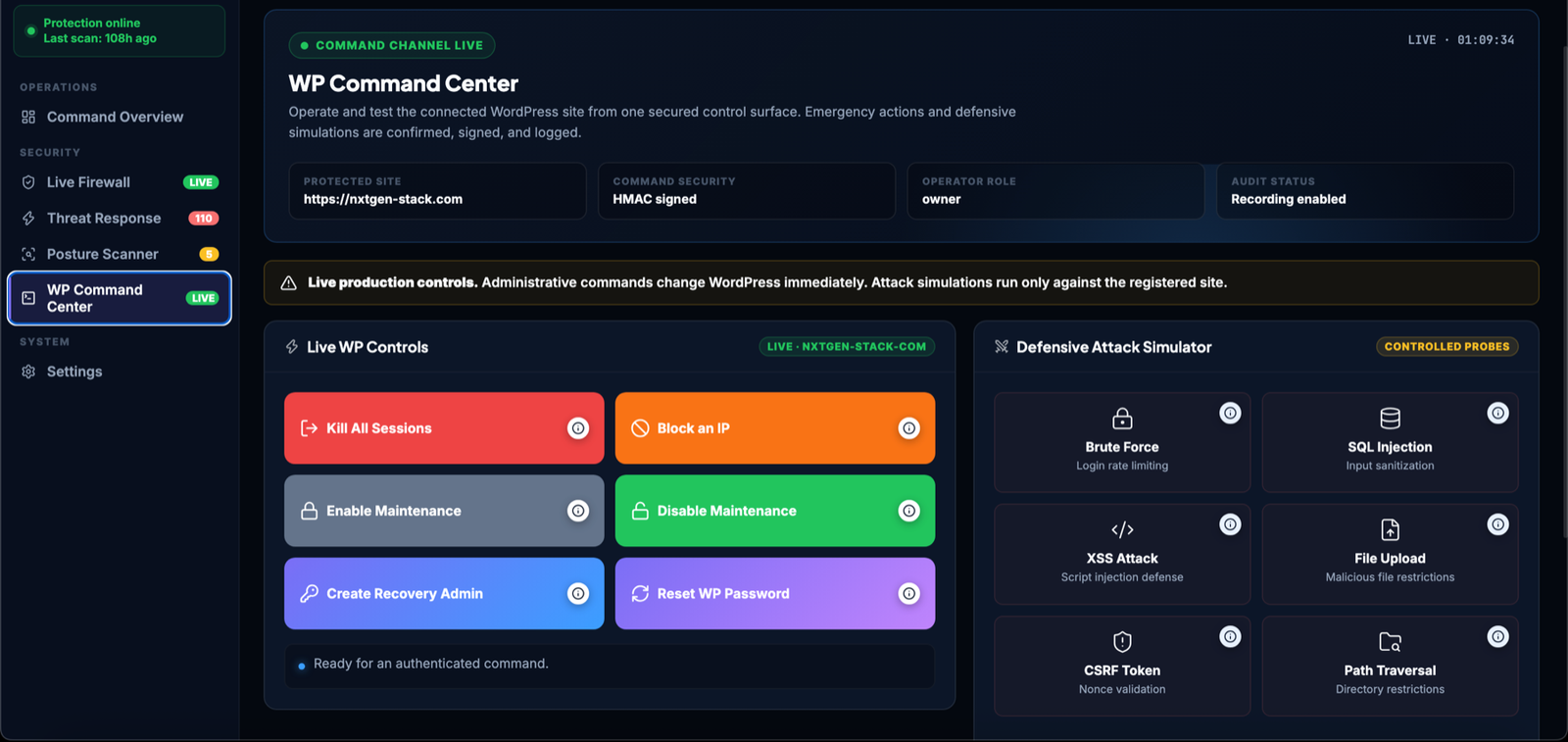
NxtGen Shield WP Command Center showing live WordPress controls, firewall and threat navigation, command security, and defensive attack simulations
Live Shield interface
Unclear priority

When everything looks urgent.

Use severity, posture findings, and verified runtime state to identify what needs review first.

Incomplete follow through

When status is visible but action is not.

Move directly from a finding or event to a firewall update, rescan, WordPress correction, or authenticated response control.

Security and trust

Protection with visible boundaries.

Shield uses authenticated workspaces, tenant-scoped records, signed agent communication, and signed WordPress commands. This page makes no certification, compliance, or guaranteed-protection claims.

01

Tenant isolation Site configuration, events, settings, and operational records are scoped to the active workspace.

02

Signed connections Agent synchronization and administrative commands use authenticated, signed requests.

03

Server-side access Email/password and Google authentication are verified before the Shield dashboard is opened.

04

Truthful status Missing events or failed synchronization are reported as unknown or failed—not presented as protection.

Review common questions

Frequently asked questions

How Shield protects your WordPress operations.

Practical answers about protection, monitoring, response, and the operational value of one connected security command center.

Already have access? Sign in
What is NxtGen Shield and how does it protect WordPress?

NxtGen Shield is a WordPress security monitoring and response command center. Its signed WordPress agent connects firewall enforcement, threat events, security posture findings, traffic activity, and authenticated response controls to one tenant-scoped workspace.

Can NxtGen Shield block WordPress attacks and suspicious IP addresses?

Yes. Shield lets an authorized operator enable protection rules, add custom rules, and block or unblock IP addresses. Successful changes are signed and synchronized to the connected WordPress firewall runtime, while failed synchronization is reported clearly.

What does the WordPress security posture scanner check?

Shield reviews WordPress core and plugin update signals, HTTPS, security headers, exposed WordPress endpoints, and agent-reported configuration. Findings include context and can be checked again with a new live scan after corrections are applied.

How does NxtGen Shield help investigate security threats?

Shield records events delivered by the connected agent, organizes them by severity, shows whether activity was detected or blocked, and provides a direct path to investigate the source or block an IP from the live firewall.

Which WordPress incident response controls are available?

Authorized operators can end active WordPress sessions, block an IP, enable or disable maintenance mode, create a temporary recovery administrator, and reset a WordPress user password through signed production controls.

Does NxtGen Shield include WordPress traffic monitoring?

Yes. The command center displays recorded page activity, live visitors, traffic trends, sources, and related tenant analytics when the connected tracker has delivered data.

Can NxtGen Shield run as a standalone app and inside NxtGen Space?

Yes. Shield supports direct email or Google authentication as a standalone product and authenticated SSO access when opened inside NxtGen Space.

Why use NxtGen Shield instead of separate WordPress security tools?

Shield brings protection state, posture findings, recorded threats, traffic context, and response actions into one workspace. This reduces tool switching and helps an authorized operator move from a verified signal to the relevant action without losing context.

NxtGen Shield

Turn visibility into control.

Create a Shield workspace or sign in to review the live command center for your connected WordPress site.